
Are you setting up your own business and have questions about what tools best help your internet marketing, and, in particular, your search engine optimization?
Like many small businesses, it can be a hassle getting things off the ground and getting noticed by Google, especially if money is tight. Never fear, however, these 5 SEO tools are some of the best in the business and can help you get your website up and off the ground in no time flat. And the best part of all – they’re free.
Contents
1. SEO Plugin by Yoast
There’s no doubt about this plugin. If you’re using the content management system WordPress, you’ll want to be using this indispensable seo tool. It’s pretty self explanatory as long as you’re willing to learn, but there are some finer points that take some outside Googleing. Yoast, the man himself, even did a tutorial write-up on it, but suffice it to say that everything from Titles, metatags, to even Google authorship markup is contained within this code – it’ll even give beginners insight into more advanced SEO topics which they can learn about on their own time.
2. Google’s Webmaster Tools
This is a bit of a no-brainer, for if you’re interested at all in SEO tactics, you should be intimately aware of this suite of tools provided by Google. And while you may use it for tracking, I highly recommend the new Data-Highlighter tool, as seen here:
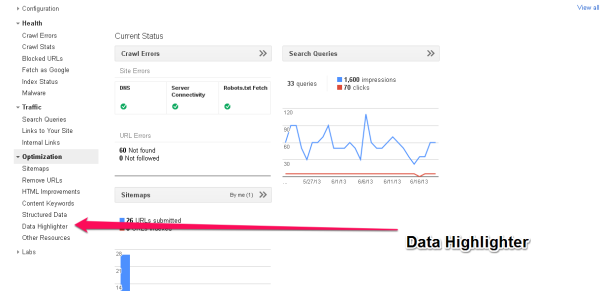
Google’s Data Highlighter
This is for those of you who know little about schema markup and still want to benefit from its application. Before you’d have to write some custom schema code into your site, but now you can just point and click and Google will do all the hard work. It will even apply the changes you make to one page to all similar pages. Highlight events, articles, even local business data.
No doubt, it’s a great tool, but don’t make the mistake of thinking it’s a catch-all. Google is big, but they’re not the whole game – especially since Apple’s Siri will now be using Bing search results when it searches for you. Link.
3SEO Workers Analyzer Tool
This is an amazing tool. Just put your desired URL (even your competition’s) into the search bar and get a comprehensive breakdown of how your page’s SEO tactics are working, what’s important, why, and how to improve. It’s invaluable. Link.
4Firebug
Firebug is a web development tool that’s of incalculable value. It’s easy to use, just add it to your Mozilla browser, right click on an element you’d like to find more information about, and see how the site is laid out. You can make changes right there in the popup window and see how it renders on the page in real time. Make a mistake and refresh the page and return to the original source code. It’s fantastic and it can tell you how a site is laid out, how divs are being called, and so much more. For any troubleshooting SEO, this is your go-to. Link.
5.)Web Developer
This is another add-on for your Firefox browser. It’s a pleasure to use, because it utilizes keyboard shortcuts. Use it to look at websites like Google would. Disable Java with just one click, and then disable all the css in a page with another. This will open up miles of information regarding what your site looks like to the Google bots and what your competitor’s sites look like. Link.

Web Developer Add-On for Firefox
If you’d like any more SEO tips or Inbound Marketing advice, feel free to contact us over at Alchemy On Demand.com